

Nokē Site Advertising Toolkit
For Nokē customers
Ask a Question or Search the Toolkit
Type what you need, such as wording for your homepage, a lock image, or how tenants share a key.
Why advertise your smart units
Tenants Pay More for Smart Units They Can See
Your Nokē smart locks support a monthly technology fee or a premium rental rate. Tenants accept either one when your website, your listings and your signs tell them what they are getting before they choose a unit.
An average $5.99 monthly technology fee is worth about $35,000 a year on a 500-unit facility, which adds about $500,000 in facility value at a 7% cap rate. These figures show potential benefits by example only and should not be relied on as a guarantee. Tenant preference from Nokē tenant research, 2022.
Online advertising
Website Copy You Can Copy and Paste
Online is where most tenants choose a unit, so start here. Replace the text in [brackets] with your details. The wording works for Nokē Infinitē and Nokē Ion smart locks.
Images and videos
Smart Lock Images and Tenant Videos for Your Website
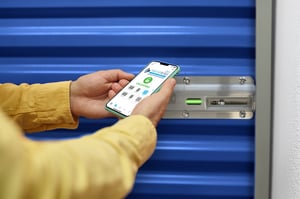
Show the lock and the app wherever you mention smart units. Tenants who see the product understand why the unit is priced differently.
Tenant Advertising Video
A short video for your homepage or smart entry page that explains phone entry, digital key sharing and unit activity to tenants.
Where to Use Video
- Homepage, beside your smart unit headline
- Smart entry page, above the app links
- Lobby or office screen, on a silent loop
- Move-in email, linked from a thumbnail
Operators also film their own. Keylock Storage and Comfort Storage each made a short welcome video that explains their smart locks in the owner's own voice.
Onsite advertising
Onsite Signage That Sells Smart Units and Helps Tenants Use Them
Signs at the street and office sell the rental. Signs at the gate and in the hallways help tenants use what they pay for. Put a QR code on each one that opens your smart entry page.
| Where | What the Sign Does | Wording to Use |
|---|---|---|
| Street and office door | Turns an after-hours visit into a move-in | Rent now. 1. Select a unit. 2. Sign up online. 3. Get the app. 4. Move in. Scan to start. |
| Office window and lobby | Sells smart units to walk-ins and to tenants in standard units | This facility has smart units. Open the gate and your unit from your phone. No codes or keys to forget. Share a digital key. See your unit activity. |
| Gate keypad | Gets new tenants through on the first visit | Using the app. 1. Open the app. 2. Tap the gate. 3. Drive in. Need help? Scan here. |
| Hallways and drive aisles | Answers questions at the unit door | How to open your unit. Scan for step-by-step help. |
| Counter | Moves help requests from the phone to your website | Need help with smart entry? Scan me. |
How Other Operators Do It
Welcome kits and how-to content
Smart Lock Welcome Kit for New Self-Storage Tenants
The welcome kit gives tenants the same four answers every time: how to download the app and log in, how to open the unit, how to share a key, and where the settings are. Use it at move-in and on your how-to page.
Nokē Ion Welcome Kit
Counter card, tenant handout and digital display for properties with Nokē Ion hardwired smart locks.
Open the Ion KitOperator examples
Self-Storage Websites That Advertise Smart Entry Well
Three Nokē operators, three places to put the message.
Common questions
Smart Unit Advertising Questions and Tenant How-To Answers
For Operators
Answers You Can Give Tenants
Need Help Getting Started?
Contact the Nokē Account Management team for help.
Contact Nokē Account Management